

Modeling the Work-Order Lifecycle Across Multiple Actors
A role-based workflow variant operates as a shared business process whose screens, editable fields, actions, transitions, and data scope change according to the authenticated user's assigned role. Modeling this workflow begins from the work-order lifecycle outward rather than from separate role-specific screens. Each runtime decision evaluates a tuple of role, record state, ownership scope, and connectivity state. The resulting policy controls visible sections, readable and editable fields, available actions, and permitted transitions.
A single work order requires four valid paths to accommodate different operational responsibilities. Duplicating the application for every role creates configuration drift and inconsistent rules across the deployment. Maintaining a single, state-aware application ensures that business logic remains centralized and auditable.
Roles represent permitted behavior rather than organizational job titles. The reference design uses four behavioral roles—Technician, Supervisor, Auditor, and Administrator—against five states: Draft, Submitted, Approved, Rejected, and Closed. Roles define the boundaries of action within the system, such as Submitter, Approver, Reviewer, or Role Administrator.
Design Principle for Role Identifiers: Use stable identifiers such as ROLE_TECHNICIAN and TRANSITION_SUBMIT internally. Labels such as Field Engineer or Send for Review can then change without invalidating rules, queued actions, or localized clients.
Matrix Mapping for Field Service Permissions
Before opening the form designer, list every role-state pair and record the allowed scope, editable field groups, actions, and destinations. Create a role matrix with separate columns for record visibility, field readability, field editability, allowed actions, valid status transitions, and administrative scope. Populate explicit grants first. Set every remaining cell to denied. Review exceptions separately. This approach makes business authority visible instead of allowing it to emerge from inherited screen settings.
Four roles across five states produce 20 initial role-state pairs before ownership, territory, multi-role membership, and offline conditions are added. Establishing a concrete baseline clarifies these interactions. Technicians create and update assigned work. Supervisors review, approve, reject, or reopen it. Auditors receive read-only access to completed records and audit history. Administrators manage users, role mappings, reference data, and deployment settings.
A technician can edit findings and attachments in Draft or Rejected states. The same fields become read-only after Submit. A supervisor can decide a Submitted record, but cannot rewrite technician findings without first using Reopen.
Separate business authority from platform authority. Account maintenance, territory mapping, reference-list updates, and deployment control do not imply permission for Approve or Reject. An administrator requires explicit assignment to a Supervisor role to authorize operational work.
Consolidating Screens and Guarding State Transitions
Build a shared work-order entity and base form. Group controls into reusable sections such as job details, technician findings, supervisor decision, audit metadata, and administration fields. Attach visibility rules to sections, edit rules to fields, and transition guards to actions.
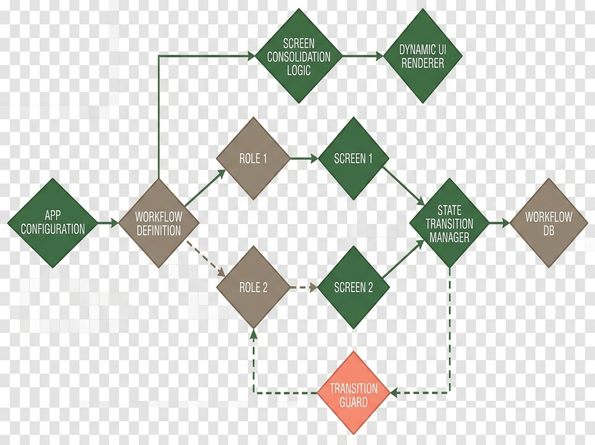
Apply conditional visibility for relevance, and keep independent permission rules for read and write access. Hiding a control fails as an authorization boundary. The service-side guard repeats the role, state, assignment, and validation checks before committing a transition.
Define seven named actions: Save Draft, Submit, Approve, Reject, Reopen, View History, and Manage Assignment. Store source and destination state identifiers with each mutating action. Deriving state changes from button labels introduces fragility into the workflow.
A Submit request independently passes authorization and business validation. The actor must be an assigned technician. The source state must be Draft or Rejected. Required findings must be present.
For overlapping roles, select one documented evaluation policy. An additive policy combines Technician and Supervisor grants. Named precedence forces a Supervisor decision rule to override Technician edit access on Submitted records.
Preserving Authorization Rules During Offline Execution
Cache only the minimum role and assignment information needed to render permitted offline tasks, together with the time and version of the last successful authorization refresh. In practice that means role identifiers, permitted assignment identifiers, territory scope, policy version, and the last successful authorization-refresh timestamp. Copying the full user-administration directory to the device wastes bandwidth and exposes unnecessary data.
Define expiration behavior for cached identity information. Permit limited drafting, require reconnection for sensitive transitions, or block access according to the application's risk profile. Offline approval belongs only in a risk model that accepts delayed revocation and stale assignment information; regulated, safety-critical, or high-impact approvals require a live authorization check.
Offline transitions are stored as pending requests. The queue envelope carries the actor identifier, role-policy version, assignment identifier, source-state version, device timestamp, transition identifier, and an idempotency key. On synchronization, the service reloads current authority and record state before accepting the request.
Handling Disconnected State Conflicts: The disconnected-approval boundary dictates that a queued Draft-to-Submitted request can preserve technician findings, but it cannot preserve authority when assignment, role policy, or the server-side source state has changed.
Consider the conflict case. A technician queues Draft-to-Submitted while disconnected. A supervisor reassigns and closes the server record before synchronization. The server rejects the stale transition, retains the technician's local findings as a recoverable draft, and returns a reason such as ASSIGNMENT_CHANGED or SOURCE_STATE_MISMATCH.
Store both original device time and server receipt time. A queued action may arrive hours after entry. Use server time for authoritative transition ordering.
Executing Scenario Tests Across Role and State Pairs
Turn the role matrix into executable scenarios. Cover each role, record state, connectivity condition, ownership condition, and attempted action. Convert each granted or denied matrix cell into a scenario with a named identity, starting state, ownership condition, connectivity condition, attempted action, expected destination, and expected audit result.
Maintain at least five dedicated identities: Technician, Supervisor, Auditor, Administrator, and a deliberate multi-role account. An unrestricted development identity is excluded from acceptance evidence.
Include positive tests, explicit denial tests, direct action invocation tests, stale-role tests, multi-role users, reassigned records, and synchronized offline queues. Release review is blocked until both the user-interface behavior and direct transition invocation produce the same decision.
For each mutating action, verify the resulting state, stored actor, transition identifier, authorization result, and audit timestamp. Checking that a button is hidden fails to test the service boundary.
A practical staged release covers roughly three to five working days with one controlled field group. Include at least one disconnect-and-resynchronize cycle before wider deployment. Before deployment, inventory Draft, Submitted, Rejected, and locally queued records separately. Approved and Closed records require checking when transition identifiers, audit storage, or read-only field rules change.
Implementing the Four-Role Field Service Workflow
Implement the example in dependency order. Create states and transition identifiers, define the four roles, configure field groups, add state-aware permissions, add server transition guards, configure the offline queue, and finally execute the named denial checks. This order keeps screen behavior subordinate to the workflow policy.
Step 1: Define States and Transitions
Create Draft, Submitted, Approved, Rejected, and Closed states for a field service work order. The state path is Draft to Submitted to Approved to Closed, with Submitted to Rejected and Rejected to Submitted as the correction loop. Reopen is a separately authorized transition rather than an editable status field.
Step 2: Configure Technician Permissions
Assign the technician permission to create assigned work orders, edit Draft or Rejected records, save locally, and submit. Make supervisor-decision fields read-only for this role.
Step 3: Configure Supervisor Permissions
Approve and Reject require a Supervisor role, a Submitted source state, current team scope, and a non-empty decision note. Administrator membership alone satisfies none of those conditions.
Step 4: Execute Release-Gate Checks
Run four release-gate checks by name: TECH_CANNOT_APPROVE, SUPERVISOR_CANNOT_EDIT_FINDINGS_WHILE_SUBMITTED, AUDITOR_CANNOT_SAVE, and ADMIN_CANNOT_APPROVE_BY_DEFAULT.
Step 5: Validate the Offline Queue
During the offline check, queue a technician submission with the observed Draft record version. At synchronization, compare that version with the service record, recheck assignment, apply Draft-to-Submitted once, and return either the committed server version or a recoverable conflict.











Join the Conversation
Share your thoughts.
Your Comment