
Why Enterprise Mobility Projects Break Before Development Starts
Is the team building a mobile app, or an operational system that must survive weak networks, shift changes, device loss, and backend delays? That distinction determines whether a project succeeds in the field or requires immediate architectural rework. Vague user roles, underestimated offline behavior, unclear ownership, and rushed platform choices routinely derail enterprise mobility initiatives.
The first decision requires strict scope discipline. Run the initial mobility scoping session before platform selection. Structure this as a 90- to 120-minute workshop with architecture, operations, security, support, and at least two field representatives. Use kickoff questions that cover weak signal areas, shift handover procedures, device replacement protocols, backend queue delays, and user identity changes on shared devices.
Summary: Position the checklist as a requirements discipline for architects, enterprise mobility teams,.NET developers, and B2B researchers to expose hidden operational constraints early.
Criteria for Selecting These Requirements
Each item in this checklist was chosen because its omission forces rework in architecture, operations, security, or long-term maintainability. Items that only affect visual preference were left out of the baseline.
Treat the checklist as a pre-selection artifact used before issuing a platform recommendation, implementation estimate, or integration design. This is not a procurement scorecard. It combines modern enterprise mobility planning with proven archival lessons from offline-capable.NET mobile systems and Adesso-era application patterns. We include historical comparison points from these early systems, specifically focusing on local persistence, synchronization queues, device provisioning, and role-specific data capture.
1. Anchor the Project to a Real Field Workflow
Define the real job being supported. Specify whether the application handles inspection, delivery confirmation, inventory updates, case handling, maintenance visits, or sales capture. The workflow item comes first because device, data, and security choices depend entirely on the job being done.
A maintenance visit in a plant corridor and a case update from a hospital ward create different architectural constraints. Document the work location at the level of the warehouse aisle, vehicle cab, customer loading dock, plant floor, remote asset site, or clinical ward rather than using a generic label such as "field user."
A delivery confirmation app that works flawlessly in a depot office can fail at a customer loading dock when the driver must capture a signature, a photo, and a barcode while the backend order system is unreachable. Require scenario notes on handoffs, interruptions, time pressure, and whether the mobile task replaces or supplements an existing desktop workflow. Capture specific interruption points: a task might be started before travel, paused during a customer interaction, resumed after the cellular signal returns, or handed off at a shift change within the same operating day.
2. Separate User Roles From Permission Groups
List operational roles by behavior, not just directory group names. Directory groups often describe access administration, not field behavior. The checklist asks teams to identify what the person actually does.
Identify roles such as technician, dispatcher, supervisor, auditor, warehouse picker, or contractor. A supervisor tablet may need broad read access and occasional approval rights, while a warehouse picker using the same application may need only task-specific scanning and no customer data visibility. Use this role clarity to prevent overbuilt screens and mismatched authentication flows.
Record whether each role performs the mobile task daily, weekly, seasonally, or only during exception handling. Identify task frequency, training levels, and error tolerance. Document shared-device patterns such as depot-issued handhelds, vehicle-mounted terminals used across shifts, contractor devices enrolled for a fixed assignment window, or supervisor tablets retained by one named user.
3. Document Devices, Peripherals, and Lifecycle Limits
Device requirements are placed ahead of platform discussion because hardware constraints can invalidate otherwise attractive application choices. Screen brightness, scanner behavior, and battery swap policies dictate the boundaries of the software.
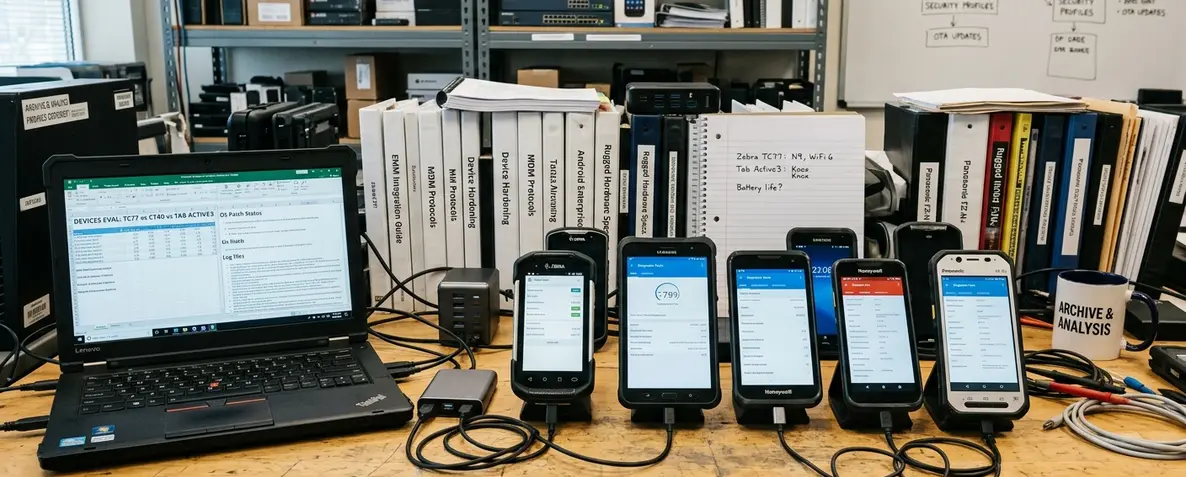
Specify supported device classes separately: rugged handhelds, consumer phones, tablets, vehicle-mounted terminals, barcode scanner sleds, NFC readers, compact printers, and camera-dependent inspection devices. Capture lifecycle details such as the operating system support window, an expected replacement cycle of roughly two to four years, battery endurance for a full shift, local storage ceilings, protective case requirements, glove use, environmental constraints, and charging availability between routes.
Historic enterprise mobility platforms often failed when hardware assumptions were treated as minor details. During testing, a rugged handheld with an integrated scanner creates entirely different test cases from a consumer phone paired with a scanner sled, especially around reconnect behavior after a sleep cycle or battery swap.
4. Define Offline Behavior Before Choosing the Stack
Offline behavior is specified before stack choice because it changes the data model and the support model. The decision sequence starts with what the user must be able to complete without the backend, then moves to synchronization mechanics.
Clarify whether the app must be always connected, occasionally connected, or fully useful during network loss. Classify connectivity as operationally offline for defined intervals such as a warehouse dead zone, a basement plant room, a rural route, or an aircraft-mode security area.
Define local data storage scope, synchronization timing, retry rules, maximum queue age, sync triggers, conflict handling, record locking, and what users can do when backend systems are unavailable. Specify whether users can create, edit, approve, or only view records while disconnected. Offline is not a feature toggle—it fundamentally changes data modeling, security, testing, and support.
5. Test Platform Fit Against Integration Reality
Platform fit is evaluated against integration reality rather than developer preference. The sequence is device capability first, offline complexity second, identity and API compatibility third, and maintenance skills last.
Evaluate whether the project belongs in a native app, a cross-platform framework, a browser-based application, or a managed enterprise mobility platform. For.NET teams, compare current framework options against backend APIs, authentication methods, device capabilities, maintenance skills, and existing code assets. Compare these options against authentication flows, camera and scanner access, background sync requirements, local database support, certificate handling, and the reuse of existing validation or service-layer code.
Avoid claiming one platform is the optimal choice universally; the recommendation depends on device depth, offline complexity, and operational support capacity. Assess whether the app needs native device APIs, browser-based reach, managed distribution controls, or deep offline behavior before choosing native, cross-platform, web, or enterprise mobility tooling.
Note: Browser-based delivery is attractive for support simplicity, but it becomes a poor fit when the field workflow depends on reliable background sync, peripheral control, or device-resident records during prolonged network loss.
6. Map Data Ownership, APIs, and System Boundaries
Identify systems of record such as ERP, CRM, asset management, identity, document repositories, scheduling, and custom line-of-business databases. Data ownership is mapped before interface design so mobile screens do not become accidental systems of record.
Define who owns each data field, what can be edited on mobile, and which updates require approval or reconciliation. Each editable field is traced to its owner and reconciliation path.
Include API maturity, latency, versioning, throttling, and fallback behavior as requirements rather than later technical cleanup. Record API behavior in operational terms: expected latency under normal load, versioning policy, throttling response, maintenance windows, retry-safe operations, and the specific fallback message shown when the system of record is unavailable.
7. Baseline Security and Device Management
Security requirements are included in the baseline because retrofitting device controls after field rollout usually creates enrollment disruption and support escalation. The checklist separates app controls from device management.
Cover identity provider integration, authentication strength, session timeouts, local data encryption, certificate handling, remote wipe capabilities, lost-device procedures, and the mobile device management enrollment path. While this methodology assumes a standard enterprise deployment model, highly regulated environments may require additional compliance mapping before finalizing identity providers.
Use NIST mobile device security guidance as an external reference point for policy structure while keeping implementation questions tied to enrollment, storage, wipe, logging, and user support.
8. Plan Deployment and First-Line Support
Deployment and support are moved ahead of launch planning because field adoption often fails at provisioning, update timing, and help desk readiness rather than code quality. The requirement owner must define how the software reaches the field.
Define rollout groups such as a pilot crew, a single depot, one region, a supervisor cohort, a contractor subset, and full operational deployment. Specify update windows, rollback triggers, enrollment scripts, device replacement paths, first-line support owners, and escalation contacts.
Document explicit troubleshooting steps for login failures, sync queue stalls, scanner failures, and missing records.
9. Define Testing and Observability Standards
Testing requirements are derived from the physical and operational conditions already captured in the checklist. Test cases are not limited to happy-path form submission; they include the states that cause field abandonment.
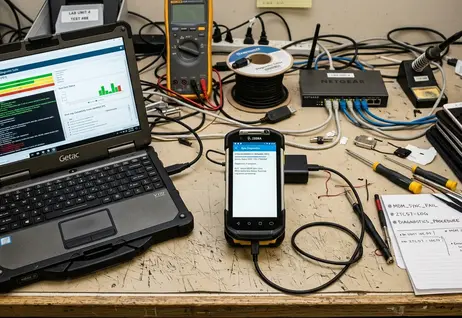
Test poor connectivity, interrupted sync, stale reference data, low battery, shared-device sign-out, camera failures, scanner disconnects, backend timeouts, and record conflicts after delayed uploads.
Require support-visible diagnostics. These must include the last successful sync time, queue depth, error category, app build, device model, operating system version, authentication state, and local storage health.
10. Establish Governance and Roadmap Ownership
Governance is included because enterprise mobility changes whenever devices, security policies, backend schemas, or field processes change. The checklist forces ownership before the first production release.
Name decision owners for feature priority, device standard changes, identity policy updates, API version changes, data model changes, support process changes, and platform upgrade timing.
Quick Tip: Track recurring cost categories qualitatively: device purchase and replacement, licensing, support staffing, integration maintenance, training refresh, test device pools, certificate renewals, and field documentation.
Next Steps
Turn this checklist into a workshop agenda. Schedule a two- to three-hour requirements workshop when the scope covers one workflow and one device family. Split the agenda into separate sessions when offline synchronization, multiple backend owners, or regulated device handling are involved. Start the initial scoping session with offline behavior, device reality, and system ownership, as those three topics expose the largest hidden implementation decisions. Mark each requirement as confirmed, assumed, or unresolved, and distribute the finalized document to architecture, operations, security, and support teams before issuing any platform recommendations.










Join the Conversation
Share your thoughts.
Your Comment