

Why Mobile Workflow Prototypes Used to Break So Late
Why did so many mobile enterprise prototypes look convincing in a conference room, then fall apart the moment they met a technician standing in a depot with a handheld and no signal?
The answer usually had nothing to do with the screens. A typical review artifact in the early 2000s was a linear deck or a clickable mockup: job list, detail view, form entry, signature, submit confirmation. Everyone in the room could follow it. Everyone approved it. The artifact looked complete because it covered every screen a person would touch.
What it did not cover was the state of the work. Cached records, failed submissions, partially completed jobs, validation rules that depended on server-side master data — none of that lived in the deck. For enterprise mobile projects in the 2003 to 2007 window, breakage tended to surface during the first device-based walkthrough or pilot preparation, not during the tidy stakeholder screen review weeks earlier.
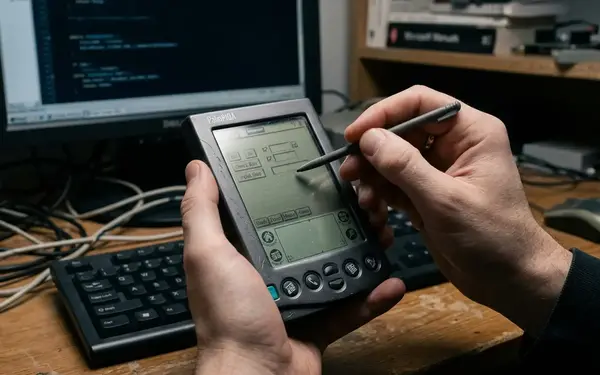
And the hidden conditions were mundane, physical things. Stylus input landing near a small touch target. Intermittent warehouse wireless. Synchronization delayed until the technician cradled the device back at the depot. A validation rule that could not fire because the reference data it needed had never reached the handheld.
Mobile workflow design, for architects and mobility teams, was never interface design. It was data capture, sync timing, local storage, and exception handling wearing an interface as a costume.
What Application Designers Actually Changed
The clearest way to define an application designer is by what a project team could actually decide inside it. Not just where a button sat, but which local entity a field was bound to, which navigation rule moved a user from inspection to signature capture, where a service call belonged, and which workflow state a record occupied.
That last part mattered most. A record could be drafted, queued, submitted, or rejected. Those are not visual choices. They are architectural ones, and the designer made them editable in the same place the screens lived.
This discussion sits specifically in the early-to-late 2000s enterprise mobility period — handheld enterprise devices, compact runtime environments, and occasionally connected application patterns. It is not about every mobile design tool, and it is not a retelling of modern low-code marketing.
The shift was social as much as technical. A field supervisor could look at a designer model and check whether the task sequence matched real site practice. A developer could look at the same model and immediately see that the flow implied local persistence, synchronization metadata, authentication handling, and integration with back-office work-order records. One artifact, two readings, one conversation.
The Breakthrough Was Not Speed Alone — It Was Constraint Visibility
The easy story is that application designers mattered because they made development faster. Rapid application development, after all, has speed in the name.
That story is incomplete. The deeper value was that designers gave teams a place to argue about constraints while the workflow was still editable. Required fields, branch logic, role-based steps, device input limits, sync dependencies, failure states — all of it surfaced early, when changing it cost a drag rather than a refactor.
Consider what a completed field-service work order actually required: an asset identifier, an inspection outcome, a failure reason, technician identity, a timestamp, and customer acknowledgement. A visual workflow made those preconditions visible, so the review turned from preference into operations.
The questions changed accordingly. What happens if the device is offline after the inspection but before submission? What happens if a barcode or asset tag will not read? What minimum data must be captured before the technician leaves the site and loses the chance forever?
Those questions land differently when the audience can see the workflow instead of imagining it. And the constraints of the period pressed hard on every answer: small portrait screens, resistive touch, sparse keyboards, slow form rendering on older fleets, and workflows interrupted by cradle-based synchronization.
A Field-Service Prototype Before and After the Designer
Picture a mobile inspection workflow for a technician carrying a rugged handheld on an assigned route.
Before
The team reviews five visible screens: job list, asset lookup, inspection form, signature capture, completion confirmation. It reads well. Stakeholders nod. Nobody asks what happens when the technician cannot find the asset record locally, because the artifact has no way to represent that record existing or not existing on the device.

After
The same workflow becomes a connected model. It carries a local job cache for the technician's assigned route, required inspection fields, status transitions, deferred submission, and integration touchpoints for work-order update and asset-history lookup.
Here is the anchor case the model finally exposes: a prototype that shows job list, inspection form, signature, and confirmation can still fail if the technician opens the job offline, completes the inspection, and receives a server-side rejection only after returning to coverage. The static deck cannot even ask that question.
A believable review session split the work. Operations walked the task sequence to confirm it matched the field. Developers marked service and persistence boundaries. Architects identified the offline storage and synchronization decisions that could not be left to generated code. Three lenses, one editable artifact.
Offline Behavior Became Part of the Prototype, Not a Footnote
Occasionally connected applications are the whole reason this distinction matters, and they are where generic mobile prototyping quietly falls apart.
Offline behavior resists static design because it is temporal, not visual. Local data state, deferred submission, conflict handling, retry behavior, partial task completion — these unfold over time and network conditions, not across a sequence of pixels.
A strong review script forces the timeline into the model. It walks the states a record can occupy: assigned but unopened, opened locally, saved as draft, queued for submission, submitted pending acknowledgement, rejected by server validation, reopened for correction. Each state implies different screen behavior and different data guarantees.
Deferred submission alone needs three things visible in the prototype: a queue state, a retry trigger such as the next network session or a cradle sync, and a user-facing outcome when the back-end refuses the update. The prototype also has to declare whether reference data rides on the device, gets fetched on demand, or simply is not available offline, because each choice rewrites validation and field behavior.
There is one catch worth stating plainly: the designer only earns its keep when it exposes data state and synchronization assumptions. A polished flow that merely simulates an "offline" message can still hide the hardest distributed-system decisions underneath a reassuring toast notification.
Where Designers Helped — and Where They Misled Teams
Treat this as an acceptance-gate problem. Teams sometimes let a designer-generated workflow pass as if it proved the runtime system, when all it had proved was that the modeled path was internally consistent.
The risk areas repeat across projects. Generated code that needs refactoring before it ships. Validation paths that exist visually but not transactionally. Service calls drawn as simple connectors. Deployment requirements missing from the model entirely.
That last category caused the quietest failures. A designer-generated service connector can make integration look trivial while hiding authentication renewal, local credential protection, retry ordering, and duplicate submission handling. The picture was clean. The runtime was not.
The design-runtime gap showed up hardest on older enterprise handheld fleets — constrained memory, slow startup, inconsistent wireless, device images locked down by corporate IT. A workflow that behaves acceptably on a developer device can degrade badly on a locked-down handheld with older firmware, limited memory, slow form rendering, and patchy coverage. Security and deployment concerns usually sat outside the artifact altogether: credential storage, local database protection, certificate handling, remote update, device provisioning, and rollback after a failed field deployment. This analysis draws on how these projects were structured and reviewed in the period, and the specifics naturally varied by fleet and by how tightly IT controlled the device image.
What Modern Platform Teams Can Still Learn From the RAD Era
The historical pattern translates cleanly into a review order modern teams can still run.
- Approve the user task sequence first.
- Trace local and remote data ownership.
- Force disconnected behavior into the open.
- Walk failure recovery, not just the happy path.
- Pin down integration contracts.
- Settle the deployment model.
- Name the operational support plan.
Modern platforms offer richer collaboration, cloud services, and generated APIs. That is real progress. But a mobile workflow can still fail if local state, synchronization timing, identity, and exception handling are not modeled early — the tooling changed, the physics did not.
For.NET-oriented platform teams, the durable lesson is a stance: treat designer artifacts as architecture inputs, useful for exposing assumptions, insufficient as evidence that storage, security, integration, and deployment are solved. The Microsoft.NET Framework documentation remains a reasonable reference point for the runtime concerns these models tend to gloss over.
How to Read Application Designers as a Turning Point
Application designers are best understood as a turning point in how enterprise teams made mobile workflow decisions visible, early, and shared.
They did not replace engineering. The temptation to say so misreads the record. What they did was move architectural conversations earlier in the lifecycle — into the room where operations, architects, developers, and mobility leads could argue about the same editable model instead of talking past each other with decks and requirements documents.
The historical value lies in that boundary-object role. A strong archival reading asks what the designer artifact made visible: role steps, validation points, cached data, service boundaries, offline states, and the engineering assumptions still left unresolved. The most relevant window runs roughly 2002 to 2008, when occasionally connected workflows became a recurring architectural concern rather than a niche exception.
So do this next: take one current mobile workflow prototype and run the seven-step review order against it, starting with a single deliberately disconnected step — open a job offline, complete it, and trace exactly what the model claims happens when the server rejects the submission after the technician regains coverage. Whatever the artifact cannot answer is your real backlog.






Join the Conversation
Share your thoughts.
Your Comment