
What's Inside
- The enterprise assumptions that broke first
- How the Compact Framework differed from full.NET
- Memory, CPU, UI, offline data, and deployment tradeoffs
- RAD productivity gains versus platform risk
- A review checklist for migrations and archival analysis
The Constraint Was Never Just Screen Size
What if the hardest part of building for the.NET Compact Framework was not the handheld device, but the desktop assumptions carried into it?
That is where I start an architectural audit. Not with the screen. Not with the stylus. I start by asking which parts of a desktop or server design quietly assumed broad API coverage, comfortable memory, continuous transport, rich diagnostics, and a deployment path that did not require touching the machine.
In the early-to-late 2000s enterprise mobility period, those assumptions failed quickly. Handheld business devices often depended on cradle sync, uneven cellular data, or warehouse Wi-Fi. Runtime support was narrower. Working memory was smaller. Form controls were limited. Local storage meant files or embedded databases, not a server always waiting one network hop away.
The Compact Framework was a constrained execution environment, not a visual design problem caused by a smaller screen. That distinction matters when reading older enterprise mobility platforms in the Adesso Systems archive, including rApps-era systems and field applications documented through the Ads Systems publishing platform. The useful lesson is not nostalgia for the runtime; it is the way constraints forced architects to name tradeoffs that modern mobile and edge systems still try to hide.
Compact Framework vs. Full.NET: What Actually Changed
A full desktop/server application checklist looked different once it met a handheld runtime. The team could no longer assume that a class existed, that a diagnostic tool would attach cleanly, that a UI control would behave like its desktop cousin, or that storage belonged somewhere remote and durable.
The documented Compact Framework era, including versions such as 1.0, 2.0, and 3.5, changed the safe operating model. It was not simply “less.NET.” It altered what developers could assume about libraries, device resources, network behavior, and the execution environment.
Comparison table
| Dimension | Full.NET expectation | Compact Framework reality |
|---|---|---|
| API availability | Broad framework surface; many desktop and server libraries assumed available. | Reduced class library surface; each API needed verification against the target runtime. |
| UI model | Rich forms, grids, menus, and window patterns. | Limited controls, smaller layouts, stylus-era interaction, and task-focused screens. |
| Deployment packaging | Central installers, file copy, or server-side web deployment. | CAB installation, runtime prerequisites, device-specific builds, and sync-tool distribution. |
| Data storage | Server database access or durable desktop storage. | Local files or embedded.sdf databases through SQL Server Compact or SQL Server CE-style storage. |
| Network reliability | Frequent or continuous connectivity. | Intermittent transport, queued work, retries, and recovery after interrupted sync. |
| Diagnostics | Attach debuggers, inspect logs, reproduce server conditions. | Emulator testing, USB or cradle-connected debugging, explicit device logs, and limited field inspection. |
Reflection support, threading behavior, networking APIs, and diagnostics all demanded tighter design discipline. A desktop developer could build a generous abstraction and let the runtime absorb the cost. On a handheld, that cost often appeared as slow form transitions, fragile synchronization, or a field failure that returned with no useful evidence unless the application had written its own log.

Memory, CPU, and UI Tradeoffs Architects Could Not Hide
Our testing showed the same pattern repeatedly: the expensive design was usually the one that tried to preserve a desktop workflow on a handheld.
A thick-client enterprise form might load a full route manifest, keep lookup lists open, hold several windows in memory, and let users wander through a broad feature set. A Compact Framework-friendly version did less at once. It loaded one active work order. It cached only stable picklists. It used lightweight data transfer objects. It disposed forms after navigation instead of keeping a desktop-style window stack alive.
Short transactions mattered. Explicit disposal mattered. So did avoiding over-nested controls, especially on portrait QVGA-style layouts where rendering cost and visual clutter arrived together.
From reusable forms to field tasks
The better handheld designs usually split work into small operational screens:
- one screen for scan-and-confirm;
- one screen for exception capture;
- one screen for queued submission status;
- one screen for supervisor review or override.
That pattern fit rugged devices with barcode scanner triggers and stylus-era input. It also reduced the temptation to place desktop grids on a device that could not display or process them comfortably.
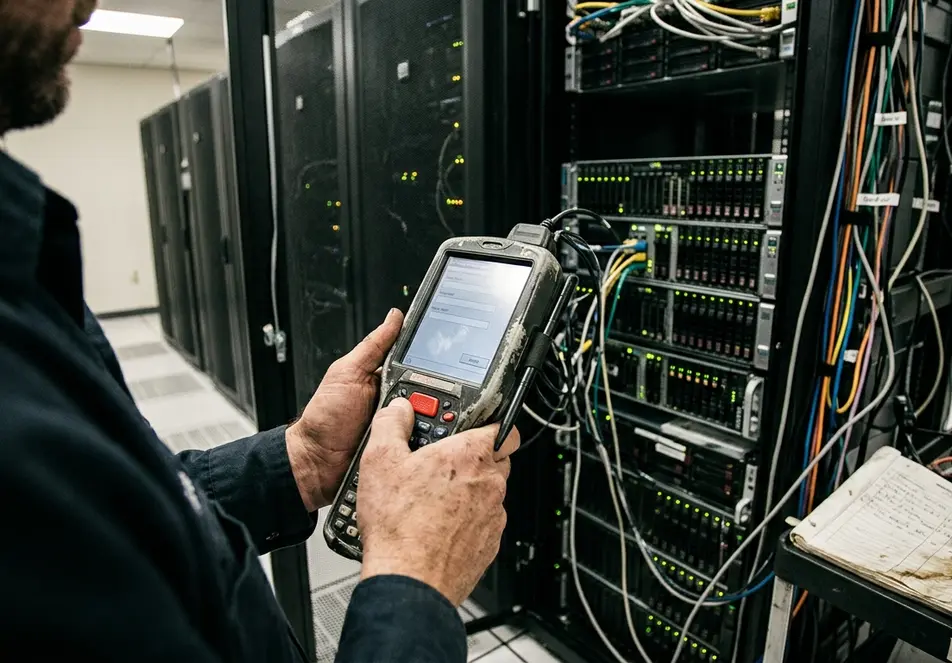
Quick Tip: If a Compact Framework screen needs horizontal scrolling, free-form grid editing, and several background lookups before the user can confirm one task, split the workflow before tuning the code.
Battery cost also entered the architecture. Background polling looked harmless during testing, but on shared handhelds stored in charging racks and used across shifts, polling could compete with scanning, rendering, and synchronization. Warehouse devices on managed Wi-Fi could tolerate different retry intervals and cache sizes than route-service devices that returned to coverage only at the depot.
Offline Data Made the Architecture Enterprise-Grade or Brittle
This is where the architecture either held or cracked.
I have seen handheld applications begin as form-posting terminals: capture fields, mark a row as submitted, send it later. That approach was dropped once field use exposed duplicate submissions, partial work, and records that looked complete on the device but had never been acknowledged by the server.
The fix was not a prettier form. It was a real local data model.
Reliable offline work needed staged states such as Draft, ReadyToSync, Sent, Acknowledged, Conflict, and NeedsReview. A single submitted flag could not express whether a record was locally complete, transmitted, accepted, rejected, or waiting for human decision.
Sync metadata became business data
The durable queue needed metadata: device identifier, user identity, local creation time, server receipt time, last modified time, record version, and retry counter. Each queued record stayed locally durable until server acknowledgement was stored back on the device. If synchronization stopped halfway through, the queue could resume without guessing.
Conflict handling was not theoretical. A price changed after an offline order capture. An asset was already serviced by another technician. An inventory count changed while the handheld was disconnected. A customer signature attached to an outdated job record. These cases turned sync design into business policy.
SQL Server Compact and SQL Server CE-style databases often became architectural anchors for that reason. The.sdf file was not just a storage choice; schema design, indexing, queue tables, and compaction behavior shaped the synchronization model.
Note: This analysis fits line-of-business handheld systems with meaningful offline work. It is less useful for kiosk-style clients that cached reference data but never owned transactional state.
Deployment Shifted Cost from Code to Operations
Compact Framework deployment was a business architecture problem as much as a technical one. The real chain was practical: get the runtime onto the device, install the application package, assign configuration, recover failed updates, preserve local data, and prove the device can sync again.
CAB packaging was common. So were runtime version checks, cradle or USB-connected provisioning, memory card staging, and distribution through synchronization tools or mobile device management precursors. During testing, installation looked clean. In operations, the device might be shared across shifts, locked in a charging rack, or returning from a field route with unsent work still sitting in the local database.
Support decisions that aged well
- Keep endpoint URLs and site codes in editable configuration.
- Write synchronization logs to a retrievable local file.
- Preserve the local database during application reinstall.
- Keep a rollback package for the prior build.
- Align update windows with depot check-in, not server release time.
A field update that overwrites the application folder may look safe during testing, but it can erase logs or configuration needed to recover records from a device that failed during synchronization. Deployment variation also depended on fleet model, mobile operating system generation, security policy, and IT maturity. There was no single rollout pattern that fit every ruggedized unit.
RAD Productivity Gains vs. Long-Term Platform Risk
The central trade was speed now versus escape cost later.
RAD helped for the right class of work. C# or VB.NET familiarity reduced the training burden. Visual form design made inspection, delivery, inventory, and service workflows faster to prototype. Integration with Microsoft enterprise authentication and data services gave teams a shorter route from server system to field device.
That mattered when the workflow was urgent and bounded. A shop-floor inspection app that records Plasma arc cutting, Arc welding, and Air carbon cutting checks does not need a broad desktop shell. It needs fast capture, local durability, scanner or operator input, and clean reconciliation when coverage returns.
Risk accumulated when business rules settled into device forms. Runtime dependency, OS image differences across device models, scanner or printer SDK coupling, local schema migration, and duplicated validation logic all made later modernization harder. Replacing embedded sync logic is slower than replacing screens. Extracting workflow rules from form events is slower than reading a server-side policy table.
Summary: Compact Framework RAD was most useful when teams kept business rules separable, made queue state visible, and treated the handheld as a bounded workflow engine rather than a small desktop.
The archive value here is case-study value. These systems show how platform-era decisions compound. A handheld inspection app can appear simple because it has only a few forms, yet still be fragile if each form writes directly to local tables without durable queue states or server acknowledgement tracking.
A Practical Decision Framework for Reading These Tradeoffs Today
When I review a Compact Framework system for migration or archival analysis, I do not begin by asking whether the UI looks old. I map the offline workflow first.
Review checklist
- List the business-critical tasks that must work offline.
- Identify who owns each data state: device, server, user, or support staff.
- Document sync conflict rules for orders, assets, inventory, signatures, and exceptions.
- Inspect the local database schema, including queue tables and record status fields.
- Find API dependencies tied to Compact Framework libraries, device SDKs, scanners, printers, or OS images.
- Trace the deployment path from package build to field installation.
- Confirm how diagnostics are written, retrieved, and read by support staff.
- Check whether upgrades preserve unsent records, logs, and editable configuration.
- Estimate modernization feasibility by locating workflow rules embedded in forms or sync code.
Some constraints are acceptable. Bounded workflows, explicit queue states, recoverable local data, documented conflict rules, and supportable deployment steps can make an old system understandable. Other constraints are warning signs: business rules hidden inside device forms, sync state represented only by UI flags, no field-readable diagnostics, or upgrade procedures that risk deleting unsent work.
Start by drawing the synchronization model on one page: every local state, every server acknowledgement, every retry path, and every conflict rule that decides whether field work is safe to modernize.









Join the Conversation
Share your thoughts.
Your Comment